Tamil Font Alt Code Tables
தமிழ் எழுத்துக்கள்
Bamini decimal codes and Unicode hex codes use different input methods. Choose the table that matches your document.
315 Bamini rows · 128 Unicode slots
Windows: Enter Bamini Alt Codes
Select Bamini in the receiving document. These are legacy slots, not Tamil Unicode values.
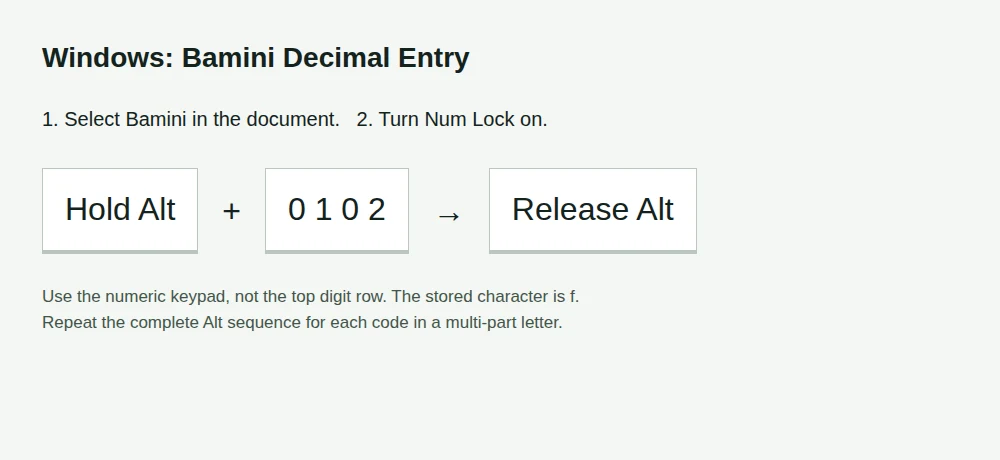
Turn on Num Lock if your keypad needs it. Hold Alt, type all four decimal digits on the numeric keypad, then release Alt.
For a sequence, release Alt after each code and repeat for the next one. For கி, enter
Alt+0102, thenAlt+0112. This storesfp.
Keep the leading zero. These values correspond to Windows-1252 character slots. The verified mapping uses ASCII-range slots, which also have the same byte values in Windows-1252. App behaviour and the selected font matter; confirm a known word first.
On a laptop, use an embedded numeric keypad only if the manufacturer supplies one. The top digit row is not a substitute. If there is no keypad, use an external one, Windows Character Map, or Word's Unicode Alt+X method below.
Complete Mapped Bamini Alt Codes
315 syllables and letters generated at build time from our verified converter mapping. “2 entries” means two complete Alt sequences; three-part vowels need three. This is the full mapped Tamil repertoire, not an invented chart for unverified extended slots.
| Tamil | Stored Keys | Alt Codes in Order | Entries |
|---|---|---|---|
| அ | m | Alt+0109 | 1 entry |
| ஆ | M | Alt+0077 | 1 entry |
| இ | , | Alt+0044 | 1 entry |
| ஈ | < | Alt+0060 | 1 entry |
| உ | c | Alt+0099 | 1 entry |
| ஊ | C | Alt+0067 | 1 entry |
| எ | v | Alt+0118 | 1 entry |
| ஏ | V | Alt+0086 | 1 entry |
| ஐ | I | Alt+0073 | 1 entry |
| ஒ | x | Alt+0120 | 1 entry |
| ஓ | X | Alt+0088 | 1 entry |
| ஔ | xs | Alt+0120 → Alt+0115 | 2 entries |
| ஃ | / | Alt+0047 | 1 entry |
| க | f | Alt+0102 | 1 entry |
| க் | f; | Alt+0102 → Alt+0059 | 2 entries |
| கா | fh | Alt+0102 → Alt+0104 | 2 entries |
| கி | fp | Alt+0102 → Alt+0112 | 2 entries |
| கீ | fP | Alt+0102 → Alt+0080 | 2 entries |
| கு | F | Alt+0070 | 1 entry |
| கூ | $ | Alt+0036 | 1 entry |
| கெ | nf | Alt+0110 → Alt+0102 | 2 entries |
| கே | Nf | Alt+0078 → Alt+0102 | 2 entries |
| கை | if | Alt+0105 → Alt+0102 | 2 entries |
| கொ | nfh | Alt+0110 → Alt+0102 → Alt+0104 | 3 entries |
| கோ | Nfh | Alt+0078 → Alt+0102 → Alt+0104 | 3 entries |
| கௌ | nfs | Alt+0110 → Alt+0102 → Alt+0115 | 3 entries |
| ங | q | Alt+0113 | 1 entry |
| ங் | q; | Alt+0113 → Alt+0059 | 2 entries |
| ஙா | qh | Alt+0113 → Alt+0104 | 2 entries |
| ஙி | qp | Alt+0113 → Alt+0112 | 2 entries |
| ஙீ | qP | Alt+0113 → Alt+0080 | 2 entries |
| ஙு | q{ | Alt+0113 → Alt+0123 | 2 entries |
| ஙூ | q_ | Alt+0113 → Alt+0095 | 2 entries |
| ஙெ | nq | Alt+0110 → Alt+0113 | 2 entries |
| ஙே | Nq | Alt+0078 → Alt+0113 | 2 entries |
| ஙை | iq | Alt+0105 → Alt+0113 | 2 entries |
| ஙொ | nqh | Alt+0110 → Alt+0113 → Alt+0104 | 3 entries |
| ஙோ | Nqh | Alt+0078 → Alt+0113 → Alt+0104 | 3 entries |
| ஙௌ | nqs | Alt+0110 → Alt+0113 → Alt+0115 | 3 entries |
| ச | r | Alt+0114 | 1 entry |
| ச் | r; | Alt+0114 → Alt+0059 | 2 entries |
| சா | rh | Alt+0114 → Alt+0104 | 2 entries |
| சி | rp | Alt+0114 → Alt+0112 | 2 entries |
| சீ | rP | Alt+0114 → Alt+0080 | 2 entries |
| சு | R | Alt+0082 | 1 entry |
| சூ | # | Alt+0035 | 1 entry |
| செ | nr | Alt+0110 → Alt+0114 | 2 entries |
| சே | Nr | Alt+0078 → Alt+0114 | 2 entries |
| சை | ir | Alt+0105 → Alt+0114 | 2 entries |
| சொ | nrh | Alt+0110 → Alt+0114 → Alt+0104 | 3 entries |
| சோ | Nrh | Alt+0078 → Alt+0114 → Alt+0104 | 3 entries |
| சௌ | nrs | Alt+0110 → Alt+0114 → Alt+0115 | 3 entries |
| ஞ | Q | Alt+0081 | 1 entry |
| ஞ் | Q; | Alt+0081 → Alt+0059 | 2 entries |
| ஞா | Qh | Alt+0081 → Alt+0104 | 2 entries |
| ஞி | Qp | Alt+0081 → Alt+0112 | 2 entries |
| ஞீ | QP | Alt+0081 → Alt+0080 | 2 entries |
| ஞு | Q{ | Alt+0081 → Alt+0123 | 2 entries |
| ஞூ | Q_ | Alt+0081 → Alt+0095 | 2 entries |
| ஞெ | nQ | Alt+0110 → Alt+0081 | 2 entries |
| ஞே | NQ | Alt+0078 → Alt+0081 | 2 entries |
| ஞை | iQ | Alt+0105 → Alt+0081 | 2 entries |
| ஞொ | nQh | Alt+0110 → Alt+0081 → Alt+0104 | 3 entries |
| ஞோ | NQh | Alt+0078 → Alt+0081 → Alt+0104 | 3 entries |
| ஞௌ | nQs | Alt+0110 → Alt+0081 → Alt+0115 | 3 entries |
| ட | l | Alt+0108 | 1 entry |
| ட் | l; | Alt+0108 → Alt+0059 | 2 entries |
| டா | lh | Alt+0108 → Alt+0104 | 2 entries |
| டி | b | Alt+0098 | 1 entry |
| டீ | B | Alt+0066 | 1 entry |
| டு | L | Alt+0076 | 1 entry |
| டூ | ^ | Alt+0094 | 1 entry |
| டெ | nl | Alt+0110 → Alt+0108 | 2 entries |
| டே | Nl | Alt+0078 → Alt+0108 | 2 entries |
| டை | il | Alt+0105 → Alt+0108 | 2 entries |
| டொ | nlh | Alt+0110 → Alt+0108 → Alt+0104 | 3 entries |
| டோ | Nlh | Alt+0078 → Alt+0108 → Alt+0104 | 3 entries |
| டௌ | nls | Alt+0110 → Alt+0108 → Alt+0115 | 3 entries |
| ண | z | Alt+0122 | 1 entry |
| ண் | z; | Alt+0122 → Alt+0059 | 2 entries |
| ணா | zh | Alt+0122 → Alt+0104 | 2 entries |
| ணி | zp | Alt+0122 → Alt+0112 | 2 entries |
| ணீ | zP | Alt+0122 → Alt+0080 | 2 entries |
| ணு | Z | Alt+0090 | 1 entry |
| ணூ | Z} | Alt+0090 → Alt+0125 | 2 entries |
| ணெ | nz | Alt+0110 → Alt+0122 | 2 entries |
| ணே | Nz | Alt+0078 → Alt+0122 | 2 entries |
| ணை | iz | Alt+0105 → Alt+0122 | 2 entries |
| ணொ | nzh | Alt+0110 → Alt+0122 → Alt+0104 | 3 entries |
| ணோ | Nzh | Alt+0078 → Alt+0122 → Alt+0104 | 3 entries |
| ணௌ | nzs | Alt+0110 → Alt+0122 → Alt+0115 | 3 entries |
| த | j | Alt+0106 | 1 entry |
| த் | j; | Alt+0106 → Alt+0059 | 2 entries |
| தா | jh | Alt+0106 → Alt+0104 | 2 entries |
| தி | jp | Alt+0106 → Alt+0112 | 2 entries |
| தீ | jP | Alt+0106 → Alt+0080 | 2 entries |
| து | J | Alt+0074 | 1 entry |
| தூ | J} | Alt+0074 → Alt+0125 | 2 entries |
| தெ | nj | Alt+0110 → Alt+0106 | 2 entries |
| தே | Nj | Alt+0078 → Alt+0106 | 2 entries |
| தை | ij | Alt+0105 → Alt+0106 | 2 entries |
| தொ | njh | Alt+0110 → Alt+0106 → Alt+0104 | 3 entries |
| தோ | Njh | Alt+0078 → Alt+0106 → Alt+0104 | 3 entries |
| தௌ | njs | Alt+0110 → Alt+0106 → Alt+0115 | 3 entries |
| ந | e | Alt+0101 | 1 entry |
| ந் | e; | Alt+0101 → Alt+0059 | 2 entries |
| நா | eh | Alt+0101 → Alt+0104 | 2 entries |
| நி | ep | Alt+0101 → Alt+0112 | 2 entries |
| நீ | eP | Alt+0101 → Alt+0080 | 2 entries |
| நு | E | Alt+0069 | 1 entry |
| நூ | E} | Alt+0069 → Alt+0125 | 2 entries |
| நெ | ne | Alt+0110 → Alt+0101 | 2 entries |
| நே | Ne | Alt+0078 → Alt+0101 | 2 entries |
| நை | ie | Alt+0105 → Alt+0101 | 2 entries |
| நொ | neh | Alt+0110 → Alt+0101 → Alt+0104 | 3 entries |
| நோ | Neh | Alt+0078 → Alt+0101 → Alt+0104 | 3 entries |
| நௌ | nes | Alt+0110 → Alt+0101 → Alt+0115 | 3 entries |
| ப | g | Alt+0103 | 1 entry |
| ப் | g; | Alt+0103 → Alt+0059 | 2 entries |
| பா | gh | Alt+0103 → Alt+0104 | 2 entries |
| பி | gp | Alt+0103 → Alt+0112 | 2 entries |
| பீ | gP | Alt+0103 → Alt+0080 | 2 entries |
| பு | G | Alt+0071 | 1 entry |
| பூ | G+ | Alt+0071 → Alt+0043 | 2 entries |
| பெ | ng | Alt+0110 → Alt+0103 | 2 entries |
| பே | Ng | Alt+0078 → Alt+0103 | 2 entries |
| பை | ig | Alt+0105 → Alt+0103 | 2 entries |
| பொ | ngh | Alt+0110 → Alt+0103 → Alt+0104 | 3 entries |
| போ | Ngh | Alt+0078 → Alt+0103 → Alt+0104 | 3 entries |
| பௌ | ngs | Alt+0110 → Alt+0103 → Alt+0115 | 3 entries |
| ம | k | Alt+0107 | 1 entry |
| ம் | k; | Alt+0107 → Alt+0059 | 2 entries |
| மா | kh | Alt+0107 → Alt+0104 | 2 entries |
| மி | kp | Alt+0107 → Alt+0112 | 2 entries |
| மீ | kP | Alt+0107 → Alt+0080 | 2 entries |
| மு | K | Alt+0075 | 1 entry |
| மூ | % | Alt+0037 | 1 entry |
| மெ | nk | Alt+0110 → Alt+0107 | 2 entries |
| மே | Nk | Alt+0078 → Alt+0107 | 2 entries |
| மை | ik | Alt+0105 → Alt+0107 | 2 entries |
| மொ | nkh | Alt+0110 → Alt+0107 → Alt+0104 | 3 entries |
| மோ | Nkh | Alt+0078 → Alt+0107 → Alt+0104 | 3 entries |
| மௌ | nks | Alt+0110 → Alt+0107 → Alt+0115 | 3 entries |
| ய | a | Alt+0097 | 1 entry |
| ய் | a; | Alt+0097 → Alt+0059 | 2 entries |
| யா | ah | Alt+0097 → Alt+0104 | 2 entries |
| யி | ap | Alt+0097 → Alt+0112 | 2 entries |
| யீ | aP | Alt+0097 → Alt+0080 | 2 entries |
| யு | A | Alt+0065 | 1 entry |
| யூ | A+ | Alt+0065 → Alt+0043 | 2 entries |
| யெ | na | Alt+0110 → Alt+0097 | 2 entries |
| யே | Na | Alt+0078 → Alt+0097 | 2 entries |
| யை | ia | Alt+0105 → Alt+0097 | 2 entries |
| யொ | nah | Alt+0110 → Alt+0097 → Alt+0104 | 3 entries |
| யோ | Nah | Alt+0078 → Alt+0097 → Alt+0104 | 3 entries |
| யௌ | nas | Alt+0110 → Alt+0097 → Alt+0115 | 3 entries |
| ர | u | Alt+0117 | 1 entry |
| ர் | u; | Alt+0117 → Alt+0059 | 2 entries |
| ரா | uh | Alt+0117 → Alt+0104 | 2 entries |
| ரி | up | Alt+0117 → Alt+0112 | 2 entries |
| ரீ | uP | Alt+0117 → Alt+0080 | 2 entries |
| ரு | U | Alt+0085 | 1 entry |
| ரூ | & | Alt+0038 | 1 entry |
| ரெ | nu | Alt+0110 → Alt+0117 | 2 entries |
| ரே | Nu | Alt+0078 → Alt+0117 | 2 entries |
| ரை | iu | Alt+0105 → Alt+0117 | 2 entries |
| ரொ | nuh | Alt+0110 → Alt+0117 → Alt+0104 | 3 entries |
| ரோ | Nuh | Alt+0078 → Alt+0117 → Alt+0104 | 3 entries |
| ரௌ | nus | Alt+0110 → Alt+0117 → Alt+0115 | 3 entries |
| ல | y | Alt+0121 | 1 entry |
| ல் | y; | Alt+0121 → Alt+0059 | 2 entries |
| லா | yh | Alt+0121 → Alt+0104 | 2 entries |
| லி | yp | Alt+0121 → Alt+0112 | 2 entries |
| லீ | yP | Alt+0121 → Alt+0080 | 2 entries |
| லு | Y | Alt+0089 | 1 entry |
| லூ | Y} | Alt+0089 → Alt+0125 | 2 entries |
| லெ | ny | Alt+0110 → Alt+0121 | 2 entries |
| லே | Ny | Alt+0078 → Alt+0121 | 2 entries |
| லை | iy | Alt+0105 → Alt+0121 | 2 entries |
| லொ | nyh | Alt+0110 → Alt+0121 → Alt+0104 | 3 entries |
| லோ | Nyh | Alt+0078 → Alt+0121 → Alt+0104 | 3 entries |
| லௌ | nys | Alt+0110 → Alt+0121 → Alt+0115 | 3 entries |
| வ | t | Alt+0116 | 1 entry |
| வ் | t; | Alt+0116 → Alt+0059 | 2 entries |
| வா | th | Alt+0116 → Alt+0104 | 2 entries |
| வி | tp | Alt+0116 → Alt+0112 | 2 entries |
| வீ | tP | Alt+0116 → Alt+0080 | 2 entries |
| வு | T | Alt+0084 | 1 entry |
| வூ | T+ | Alt+0084 → Alt+0043 | 2 entries |
| வெ | nt | Alt+0110 → Alt+0116 | 2 entries |
| வே | Nt | Alt+0078 → Alt+0116 | 2 entries |
| வை | it | Alt+0105 → Alt+0116 | 2 entries |
| வொ | nth | Alt+0110 → Alt+0116 → Alt+0104 | 3 entries |
| வோ | Nth | Alt+0078 → Alt+0116 → Alt+0104 | 3 entries |
| வௌ | nts | Alt+0110 → Alt+0116 → Alt+0115 | 3 entries |
| ழ | o | Alt+0111 | 1 entry |
| ழ் | o; | Alt+0111 → Alt+0059 | 2 entries |
| ழா | oh | Alt+0111 → Alt+0104 | 2 entries |
| ழி | op | Alt+0111 → Alt+0112 | 2 entries |
| ழீ | oP | Alt+0111 → Alt+0080 | 2 entries |
| ழு | O | Alt+0079 | 1 entry |
| ழூ | * | Alt+0042 | 1 entry |
| ழெ | no | Alt+0110 → Alt+0111 | 2 entries |
| ழே | No | Alt+0078 → Alt+0111 | 2 entries |
| ழை | io | Alt+0105 → Alt+0111 | 2 entries |
| ழொ | noh | Alt+0110 → Alt+0111 → Alt+0104 | 3 entries |
| ழோ | Noh | Alt+0078 → Alt+0111 → Alt+0104 | 3 entries |
| ழௌ | nos | Alt+0110 → Alt+0111 → Alt+0115 | 3 entries |
| ள | s | Alt+0115 | 1 entry |
| ள் | s; | Alt+0115 → Alt+0059 | 2 entries |
| ளா | sh | Alt+0115 → Alt+0104 | 2 entries |
| ளி | sp | Alt+0115 → Alt+0112 | 2 entries |
| ளீ | sP | Alt+0115 → Alt+0080 | 2 entries |
| ளு | S | Alt+0083 | 1 entry |
| ளூ | Sh | Alt+0083 → Alt+0104 | 2 entries |
| ளெ | ns | Alt+0110 → Alt+0115 | 2 entries |
| ளே | Ns | Alt+0078 → Alt+0115 | 2 entries |
| ளை | is | Alt+0105 → Alt+0115 | 2 entries |
| ளொ | nsh | Alt+0110 → Alt+0115 → Alt+0104 | 3 entries |
| ளோ | Nsh | Alt+0078 → Alt+0115 → Alt+0104 | 3 entries |
| ளௌ | nss | Alt+0110 → Alt+0115 → Alt+0115 | 3 entries |
| ற | w | Alt+0119 | 1 entry |
| ற் | w; | Alt+0119 → Alt+0059 | 2 entries |
| றா | wh | Alt+0119 → Alt+0104 | 2 entries |
| றி | wp | Alt+0119 → Alt+0112 | 2 entries |
| றீ | wP | Alt+0119 → Alt+0080 | 2 entries |
| று | W | Alt+0087 | 1 entry |
| றூ | W} | Alt+0087 → Alt+0125 | 2 entries |
| றெ | nw | Alt+0110 → Alt+0119 | 2 entries |
| றே | Nw | Alt+0078 → Alt+0119 | 2 entries |
| றை | iw | Alt+0105 → Alt+0119 | 2 entries |
| றொ | nwh | Alt+0110 → Alt+0119 → Alt+0104 | 3 entries |
| றோ | Nwh | Alt+0078 → Alt+0119 → Alt+0104 | 3 entries |
| றௌ | nws | Alt+0110 → Alt+0119 → Alt+0115 | 3 entries |
| ன | d | Alt+0100 | 1 entry |
| ன் | d; | Alt+0100 → Alt+0059 | 2 entries |
| னா | dh | Alt+0100 → Alt+0104 | 2 entries |
| னி | dp | Alt+0100 → Alt+0112 | 2 entries |
| னீ | dP | Alt+0100 → Alt+0080 | 2 entries |
| னு | D | Alt+0068 | 1 entry |
| னூ | D} | Alt+0068 → Alt+0125 | 2 entries |
| னெ | nd | Alt+0110 → Alt+0100 | 2 entries |
| னே | Nd | Alt+0078 → Alt+0100 | 2 entries |
| னை | id | Alt+0105 → Alt+0100 | 2 entries |
| னொ | ndh | Alt+0110 → Alt+0100 → Alt+0104 | 3 entries |
| னோ | Ndh | Alt+0078 → Alt+0100 → Alt+0104 | 3 entries |
| னௌ | nds | Alt+0110 → Alt+0100 → Alt+0115 | 3 entries |
| ஜ | [ | Alt+0091 | 1 entry |
| ஜ் | [; | Alt+0091 → Alt+0059 | 2 entries |
| ஜா | [h | Alt+0091 → Alt+0104 | 2 entries |
| ஜி | [p | Alt+0091 → Alt+0112 | 2 entries |
| ஜீ | [P | Alt+0091 → Alt+0080 | 2 entries |
| ஜு | [{ | Alt+0091 → Alt+0123 | 2 entries |
| ஜூ | [_ | Alt+0091 → Alt+0095 | 2 entries |
| ஜெ | n[ | Alt+0110 → Alt+0091 | 2 entries |
| ஜே | N[ | Alt+0078 → Alt+0091 | 2 entries |
| ஜை | i[ | Alt+0105 → Alt+0091 | 2 entries |
| ஜொ | n[h | Alt+0110 → Alt+0091 → Alt+0104 | 3 entries |
| ஜோ | N[h | Alt+0078 → Alt+0091 → Alt+0104 | 3 entries |
| ஜௌ | n[s | Alt+0110 → Alt+0091 → Alt+0115 | 3 entries |
| ஷ | \ | Alt+0092 | 1 entry |
| ஷ் | \; | Alt+0092 → Alt+0059 | 2 entries |
| ஷா | \h | Alt+0092 → Alt+0104 | 2 entries |
| ஷி | \p | Alt+0092 → Alt+0112 | 2 entries |
| ஷீ | \P | Alt+0092 → Alt+0080 | 2 entries |
| ஷு | \{ | Alt+0092 → Alt+0123 | 2 entries |
| ஷூ | \_ | Alt+0092 → Alt+0095 | 2 entries |
| ஷெ | n\ | Alt+0110 → Alt+0092 | 2 entries |
| ஷே | N\ | Alt+0078 → Alt+0092 | 2 entries |
| ஷை | i\ | Alt+0105 → Alt+0092 | 2 entries |
| ஷொ | n\h | Alt+0110 → Alt+0092 → Alt+0104 | 3 entries |
| ஷோ | N\h | Alt+0078 → Alt+0092 → Alt+0104 | 3 entries |
| ஷௌ | n\s | Alt+0110 → Alt+0092 → Alt+0115 | 3 entries |
| ஸ | ] | Alt+0093 | 1 entry |
| ஸ் | ]; | Alt+0093 → Alt+0059 | 2 entries |
| ஸா | ]h | Alt+0093 → Alt+0104 | 2 entries |
| ஸி | ]p | Alt+0093 → Alt+0112 | 2 entries |
| ஸீ | ]P | Alt+0093 → Alt+0080 | 2 entries |
| ஸு | ]{ | Alt+0093 → Alt+0123 | 2 entries |
| ஸூ | ]_ | Alt+0093 → Alt+0095 | 2 entries |
| ஸெ | n] | Alt+0110 → Alt+0093 | 2 entries |
| ஸே | N] | Alt+0078 → Alt+0093 | 2 entries |
| ஸை | i] | Alt+0105 → Alt+0093 | 2 entries |
| ஸொ | n]h | Alt+0110 → Alt+0093 → Alt+0104 | 3 entries |
| ஸோ | N]h | Alt+0078 → Alt+0093 → Alt+0104 | 3 entries |
| ஸௌ | n]s | Alt+0110 → Alt+0093 → Alt+0115 | 3 entries |
| ஹ | ` | Alt+0096 | 1 entry |
| ஹ் | `; | Alt+0096 → Alt+0059 | 2 entries |
| ஹா | `h | Alt+0096 → Alt+0104 | 2 entries |
| ஹி | `p | Alt+0096 → Alt+0112 | 2 entries |
| ஹீ | `P | Alt+0096 → Alt+0080 | 2 entries |
| ஹு | `{ | Alt+0096 → Alt+0123 | 2 entries |
| ஹூ | `_ | Alt+0096 → Alt+0095 | 2 entries |
| ஹெ | n` | Alt+0110 → Alt+0096 | 2 entries |
| ஹே | N` | Alt+0078 → Alt+0096 | 2 entries |
| ஹை | i` | Alt+0105 → Alt+0096 | 2 entries |
| ஹொ | n`h | Alt+0110 → Alt+0096 → Alt+0104 | 3 entries |
| ஹோ | N`h | Alt+0078 → Alt+0096 → Alt+0104 | 3 entries |
| ஹௌ | n`s | Alt+0110 → Alt+0096 → Alt+0115 | 3 entries |
| ஸ்ரீ | = | Alt+0061 | 1 entry |
| ◌ா | h | Alt+0104 | 1 entry |
| ◌ி | p | Alt+0112 | 1 entry |
| ◌ீ | P | Alt+0080 | 1 entry |
| ◌ு | { | Alt+0123 | 1 entry |
| ◌ூ | _ | Alt+0095 | 1 entry |
| ◌் | ; | Alt+0059 | 1 entry |
| ◌ெ | n | Alt+0110 | 1 entry |
| ◌ே | N | Alt+0078 | 1 entry |
| ◌ை | i | Alt+0105 | 1 entry |
| , | > | Alt+0062 | 1 entry |
| ; | @ | Alt+0064 | 1 entry |
| ' | | | Alt+0124 | 1 entry |
| ர் | H | Alt+0072 | 1 entry |
| ◌ே (alternate) | nn | Alt+0110 → Alt+0110 | 2 entries |
| ◌ௌ (closing mark) | s | Alt+0115 | 1 entry |
About Alt+0167: Windows-1252 assigns this to §. It is absent from our verified Bamini mapping. Different “Bamini” or “Baamini” files can place extra glyphs in different slots. We do not label this as a Tamil letter without a verified mapping.
Word: Use Unicode With Alt+X
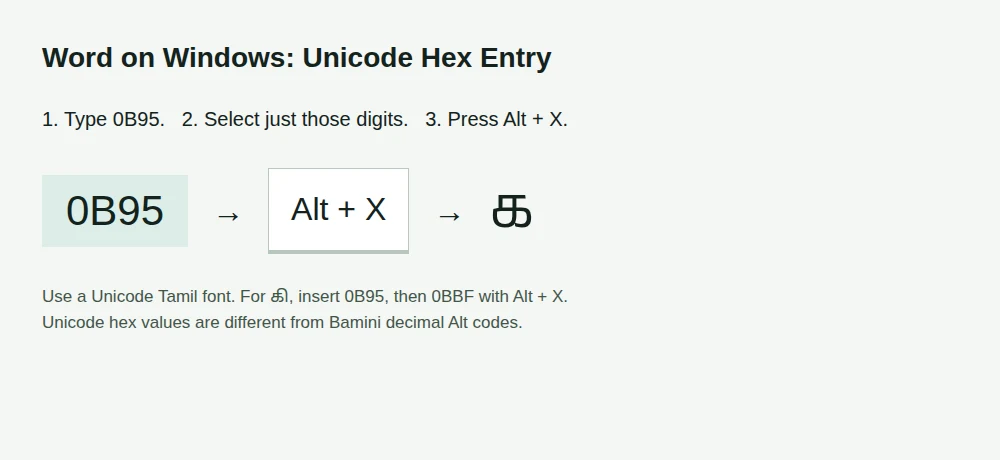
For standard Tamil text, choose a Unicode Tamil font. In desktop Word on Windows, type the hex digits, select those digits, then press Alt + X. Selecting the digits prevents nearby letters A to F being included accidentally. 0B95 becomes க.
For கி, insert 0B95 with Alt+X, then 0BBF with Alt+X. Unicode stores the consonant before its combining vowel sign, including signs drawn to the left. The code table lists individual code points; combined syllables do not each have their own code point.
Mac: Unicode Hex Input
Add Unicode Hex Input in System Settings → Keyboard → Text Input → Edit, using the add input source button. Choose it in the Input menu. Hold Option while typing the four hexadecimal digits, then release Option. For க, use 0B95. Repeat for a vowel sign when needed. Switch back to your usual input source when finished.
If Unicode Hex Input is unavailable in your input-source list, use a Tamil input source or copy Unicode text from our Tamil Keyboard. Windows decimal Alt codes do not carry over to this Mac method.
Tamil Unicode Block: U+0B80 to U+0BFF
Every slot is shown, including unassigned positions. Dotted circles make combining signs visible and are not part of the character. Do not enter unassigned slots. Tamil Supplement is a separate Unicode block.
| Character | Hex for Alt+X | Unicode Name |
|---|---|---|
| Unassigned | 0B80 | Unassigned |
| Unassigned | 0B81 | Unassigned |
| ◌ஂ | 0B82 | TAMIL SIGN ANUSVARA |
| ஃ | 0B83 | TAMIL SIGN VISARGA |
| Unassigned | 0B84 | Unassigned |
| அ | 0B85 | TAMIL LETTER A |
| ஆ | 0B86 | TAMIL LETTER AA |
| இ | 0B87 | TAMIL LETTER I |
| ஈ | 0B88 | TAMIL LETTER II |
| உ | 0B89 | TAMIL LETTER U |
| ஊ | 0B8A | TAMIL LETTER UU |
| Unassigned | 0B8B | Unassigned |
| Unassigned | 0B8C | Unassigned |
| Unassigned | 0B8D | Unassigned |
| எ | 0B8E | TAMIL LETTER E |
| ஏ | 0B8F | TAMIL LETTER EE |
| ஐ | 0B90 | TAMIL LETTER AI |
| Unassigned | 0B91 | Unassigned |
| ஒ | 0B92 | TAMIL LETTER O |
| ஓ | 0B93 | TAMIL LETTER OO |
| ஔ | 0B94 | TAMIL LETTER AU |
| க | 0B95 | TAMIL LETTER KA |
| Unassigned | 0B96 | Unassigned |
| Unassigned | 0B97 | Unassigned |
| Unassigned | 0B98 | Unassigned |
| ங | 0B99 | TAMIL LETTER NGA |
| ச | 0B9A | TAMIL LETTER CA |
| Unassigned | 0B9B | Unassigned |
| ஜ | 0B9C | TAMIL LETTER JA |
| Unassigned | 0B9D | Unassigned |
| ஞ | 0B9E | TAMIL LETTER NYA |
| ட | 0B9F | TAMIL LETTER TTA |
| Unassigned | 0BA0 | Unassigned |
| Unassigned | 0BA1 | Unassigned |
| Unassigned | 0BA2 | Unassigned |
| ண | 0BA3 | TAMIL LETTER NNA |
| த | 0BA4 | TAMIL LETTER TA |
| Unassigned | 0BA5 | Unassigned |
| Unassigned | 0BA6 | Unassigned |
| Unassigned | 0BA7 | Unassigned |
| ந | 0BA8 | TAMIL LETTER NA |
| ன | 0BA9 | TAMIL LETTER NNNA |
| ப | 0BAA | TAMIL LETTER PA |
| Unassigned | 0BAB | Unassigned |
| Unassigned | 0BAC | Unassigned |
| Unassigned | 0BAD | Unassigned |
| ம | 0BAE | TAMIL LETTER MA |
| ய | 0BAF | TAMIL LETTER YA |
| ர | 0BB0 | TAMIL LETTER RA |
| ற | 0BB1 | TAMIL LETTER RRA |
| ல | 0BB2 | TAMIL LETTER LA |
| ள | 0BB3 | TAMIL LETTER LLA |
| ழ | 0BB4 | TAMIL LETTER LLLA |
| வ | 0BB5 | TAMIL LETTER VA |
| ஶ | 0BB6 | TAMIL LETTER SHA |
| ஷ | 0BB7 | TAMIL LETTER SSA |
| ஸ | 0BB8 | TAMIL LETTER SA |
| ஹ | 0BB9 | TAMIL LETTER HA |
| Unassigned | 0BBA | Unassigned |
| Unassigned | 0BBB | Unassigned |
| Unassigned | 0BBC | Unassigned |
| Unassigned | 0BBD | Unassigned |
| ◌ா | 0BBE | TAMIL VOWEL SIGN AA |
| ◌ி | 0BBF | TAMIL VOWEL SIGN I |
| ◌ீ | 0BC0 | TAMIL VOWEL SIGN II |
| ◌ு | 0BC1 | TAMIL VOWEL SIGN U |
| ◌ூ | 0BC2 | TAMIL VOWEL SIGN UU |
| Unassigned | 0BC3 | Unassigned |
| Unassigned | 0BC4 | Unassigned |
| Unassigned | 0BC5 | Unassigned |
| ◌ெ | 0BC6 | TAMIL VOWEL SIGN E |
| ◌ே | 0BC7 | TAMIL VOWEL SIGN EE |
| ◌ை | 0BC8 | TAMIL VOWEL SIGN AI |
| Unassigned | 0BC9 | Unassigned |
| ◌ொ | 0BCA | TAMIL VOWEL SIGN O |
| ◌ோ | 0BCB | TAMIL VOWEL SIGN OO |
| ◌ௌ | 0BCC | TAMIL VOWEL SIGN AU |
| ◌் | 0BCD | TAMIL SIGN VIRAMA |
| Unassigned | 0BCE | Unassigned |
| Unassigned | 0BCF | Unassigned |
| ௐ | 0BD0 | TAMIL OM |
| Unassigned | 0BD1 | Unassigned |
| Unassigned | 0BD2 | Unassigned |
| Unassigned | 0BD3 | Unassigned |
| Unassigned | 0BD4 | Unassigned |
| Unassigned | 0BD5 | Unassigned |
| Unassigned | 0BD6 | Unassigned |
| ◌ௗ | 0BD7 | TAMIL AU LENGTH MARK |
| Unassigned | 0BD8 | Unassigned |
| Unassigned | 0BD9 | Unassigned |
| Unassigned | 0BDA | Unassigned |
| Unassigned | 0BDB | Unassigned |
| Unassigned | 0BDC | Unassigned |
| Unassigned | 0BDD | Unassigned |
| Unassigned | 0BDE | Unassigned |
| Unassigned | 0BDF | Unassigned |
| Unassigned | 0BE0 | Unassigned |
| Unassigned | 0BE1 | Unassigned |
| Unassigned | 0BE2 | Unassigned |
| Unassigned | 0BE3 | Unassigned |
| Unassigned | 0BE4 | Unassigned |
| Unassigned | 0BE5 | Unassigned |
| ௦ | 0BE6 | TAMIL DIGIT ZERO |
| ௧ | 0BE7 | TAMIL DIGIT ONE |
| ௨ | 0BE8 | TAMIL DIGIT TWO |
| ௩ | 0BE9 | TAMIL DIGIT THREE |
| ௪ | 0BEA | TAMIL DIGIT FOUR |
| ௫ | 0BEB | TAMIL DIGIT FIVE |
| ௬ | 0BEC | TAMIL DIGIT SIX |
| ௭ | 0BED | TAMIL DIGIT SEVEN |
| ௮ | 0BEE | TAMIL DIGIT EIGHT |
| ௯ | 0BEF | TAMIL DIGIT NINE |
| ௰ | 0BF0 | TAMIL NUMBER TEN |
| ௱ | 0BF1 | TAMIL NUMBER ONE HUNDRED |
| ௲ | 0BF2 | TAMIL NUMBER ONE THOUSAND |
| ௳ | 0BF3 | TAMIL DAY SIGN |
| ௴ | 0BF4 | TAMIL MONTH SIGN |
| ௵ | 0BF5 | TAMIL YEAR SIGN |
| ௶ | 0BF6 | TAMIL DEBIT SIGN |
| ௷ | 0BF7 | TAMIL CREDIT SIGN |
| ௸ | 0BF8 | TAMIL AS ABOVE SIGN |
| ௹ | 0BF9 | TAMIL RUPEE SIGN |
| ௺ | 0BFA | TAMIL NUMBER SIGN |
| Unassigned | 0BFB | Unassigned |
| Unassigned | 0BFC | Unassigned |
| Unassigned | 0BFD | Unassigned |
| Unassigned | 0BFE | Unassigned |
| Unassigned | 0BFF | Unassigned |
Questions People Ask
Is Alt+0167 the Tamil letter code?
No universal Tamil letter has that Alt code: Windows-1252 assigns the value 167 to the section sign. A legacy font may draw a different glyph at that position. Our verified Bamini mapping does not assign it, so this table does not guess a Tamil meaning from another font’s screenshot.
Why do my Alt codes produce English letters?
You are entering legacy character slots, and their visible shapes depend on the selected font. Check that your document uses the exact font whose table you followed. For Unicode Tamil in Word, use the Unicode hex table and Alt + X, rather than treating Bamini decimal values as Unicode codes.
Can I use the top number row for Windows Alt codes?
No, Microsoft’s decimal Alt entry method uses the numeric keypad, with Num Lock enabled when required. The number row above the letters is not a substitute. If your laptop lacks a keypad, use Word’s Unicode hex method, copy a character from the table, or use a Tamil keyboard instead.
How do I enter a Tamil Unicode value with Alt+X in Word?
Type the hexadecimal value from the Unicode table, select just those digits and press Alt + X in Word. Selecting the digits prevents adjacent hexadecimal-looking characters from being included. Apply a Unicode Tamil font to the result; this method is different from holding Alt while entering decimal keypad digits.
Why do some Tamil syllables need several Alt codes?
A legacy Bamini syllable can use several glyph pieces, so the table lists a separate decimal code for each stored character. Enter them in the listed order instead of joining all the digits into one number. Prefix vowel pieces can appear before the consonant in the legacy sequence.
Should I keep the leading zero in a listed Alt code?
Yes, enter the code as listed, including the leading zero. This page labels its decimal values using the Windows-1252 mapping rather than promising the same result for every Alt-entry convention. Keep the matching font selected and test one character before entering a whole passage this way.
Can I use these Tamil Alt codes on a phone?
Use a Tamil keyboard or copy the character instead of trying desktop Alt shortcuts on a phone. This table is a reference for hardware-key entry and stored values. Our Tamil typing editor provides Unicode text you can copy without having to enter a sequence of numeric keypad codes.
Will one Tamil Alt-code chart work with Bamini and Vanavil?
No, a legacy numeric code identifies a character slot, whose Tamil shape depends on the font’s mapping. This page’s legacy table is generated from the verified Bamini data. Do not apply it to Vanavil by assumption; identify the font and use its matching converter or character map instead.
How can I find a Bamini code without scrolling through the table?
Use the search field above the code table to narrow its rows by Tamil, keys or codes. The listed key sequence and decimal entries describe the same mapped result. If you only need a word rather than its numeric values, use the Bamini keyboard instead.
Are Unicode hex values the same as Bamini decimal Alt values?
No, the Unicode column identifies Tamil characters, while the Bamini decimal entries describe legacy font slots. Converting the number from decimal to hexadecimal does not convert the text encoding. Use the Bamini converter for existing text, and the Unicode table when inspecting individual character values.
Sources
Every fact on this page was checked against these official pages on . Products change often; if something here is out of date, tell us.
- Microsoft: ASCII and Unicode Entry, Keypad and Alt+X support.microsoft.com
- Microsoft: Windows Code Page 1252 learn.microsoft.com
- Unicode: Windows-1252 Mapping unicode.org
- Unicode: Hex Entry on Windows and macOS unicode.org
- Unicode: Tamil Chart and Character Names unicode.org
- Keyman: Bamini Keyboard Mapping github.com
- Apple: Add and Switch Input Sources support.apple.com