Tamil Keyboard Picture
தமிழ் விசைப்பலகை படம்
Printable Tamil typing keyboard images for all five layouts, drawn from the keyboards that actually type them.
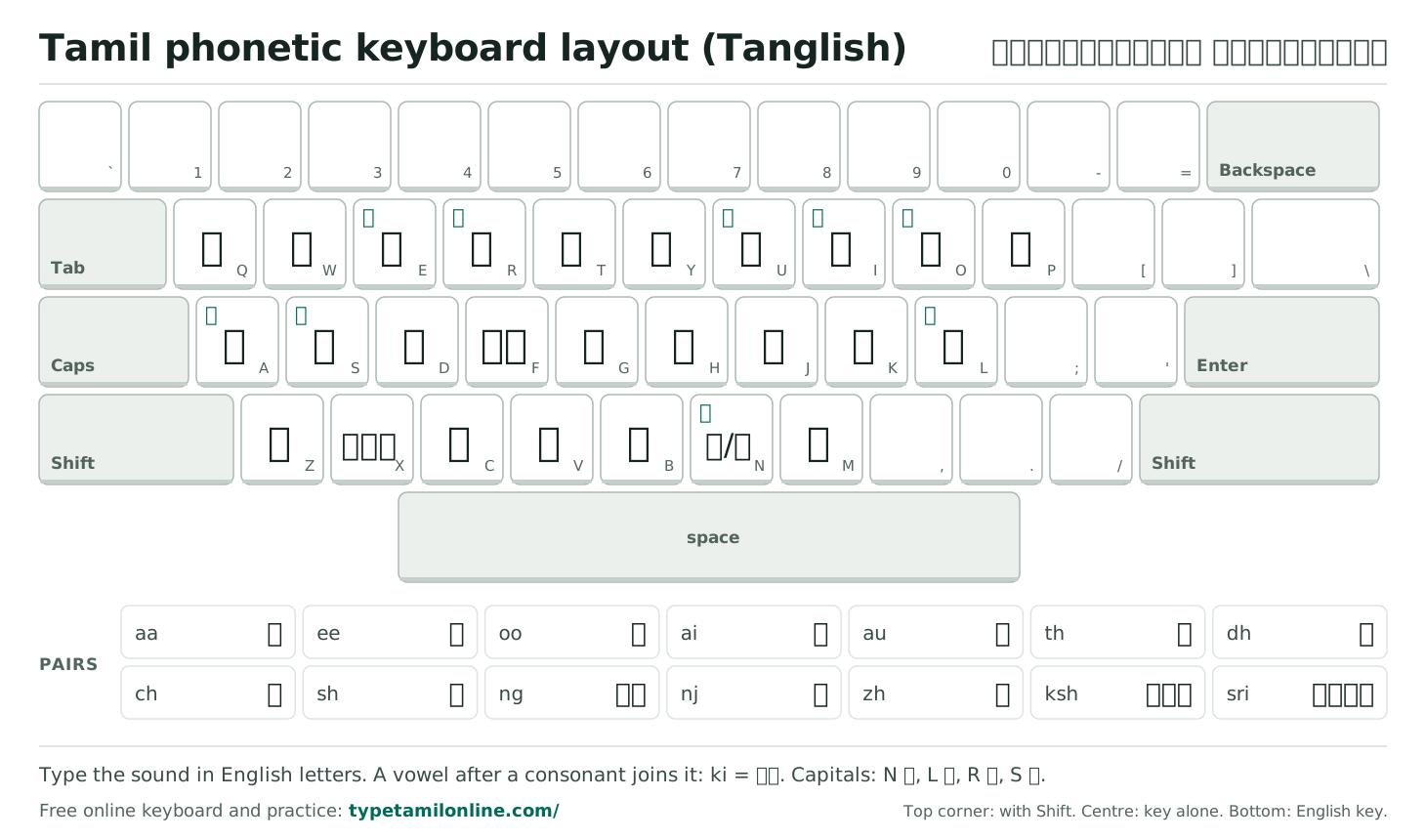
Tamil Phonetic Keyboard Layout (Tanglish)
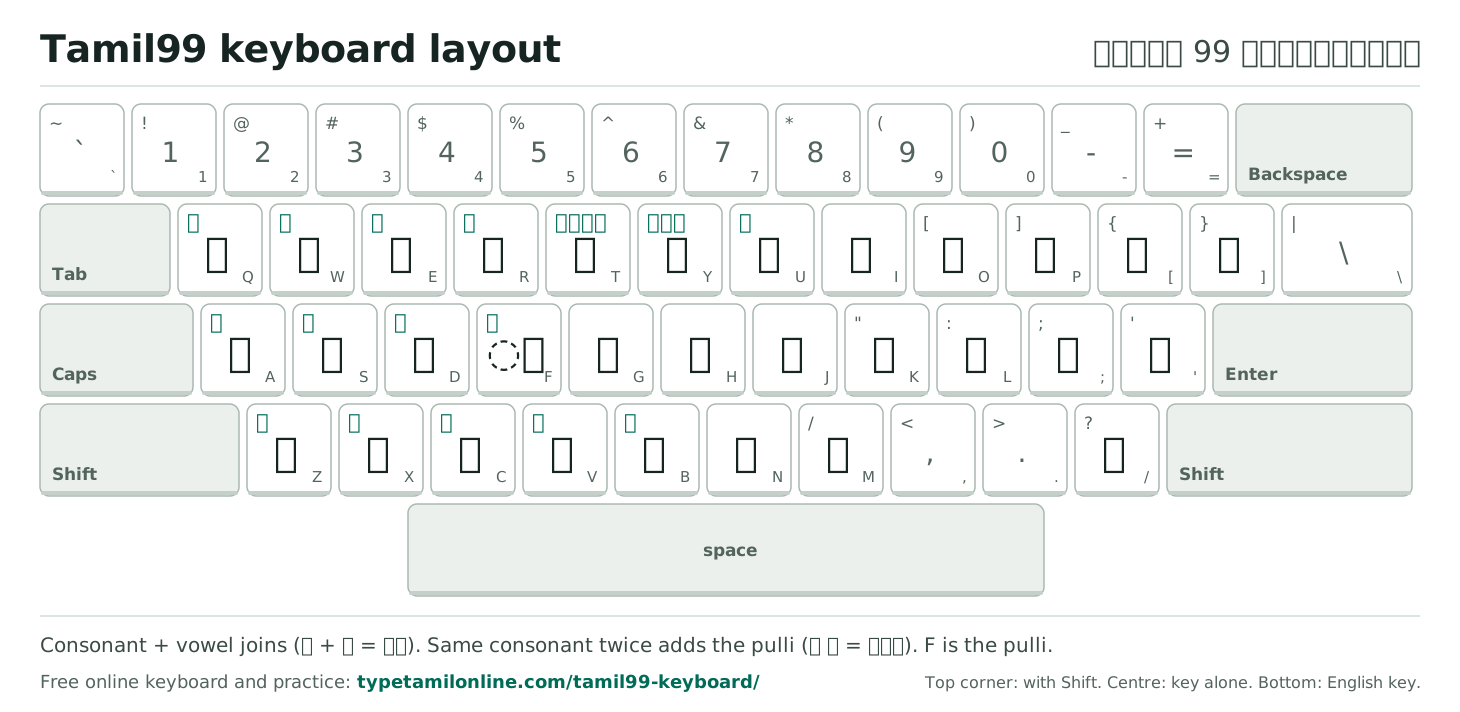
Tamil99 Keyboard Layout
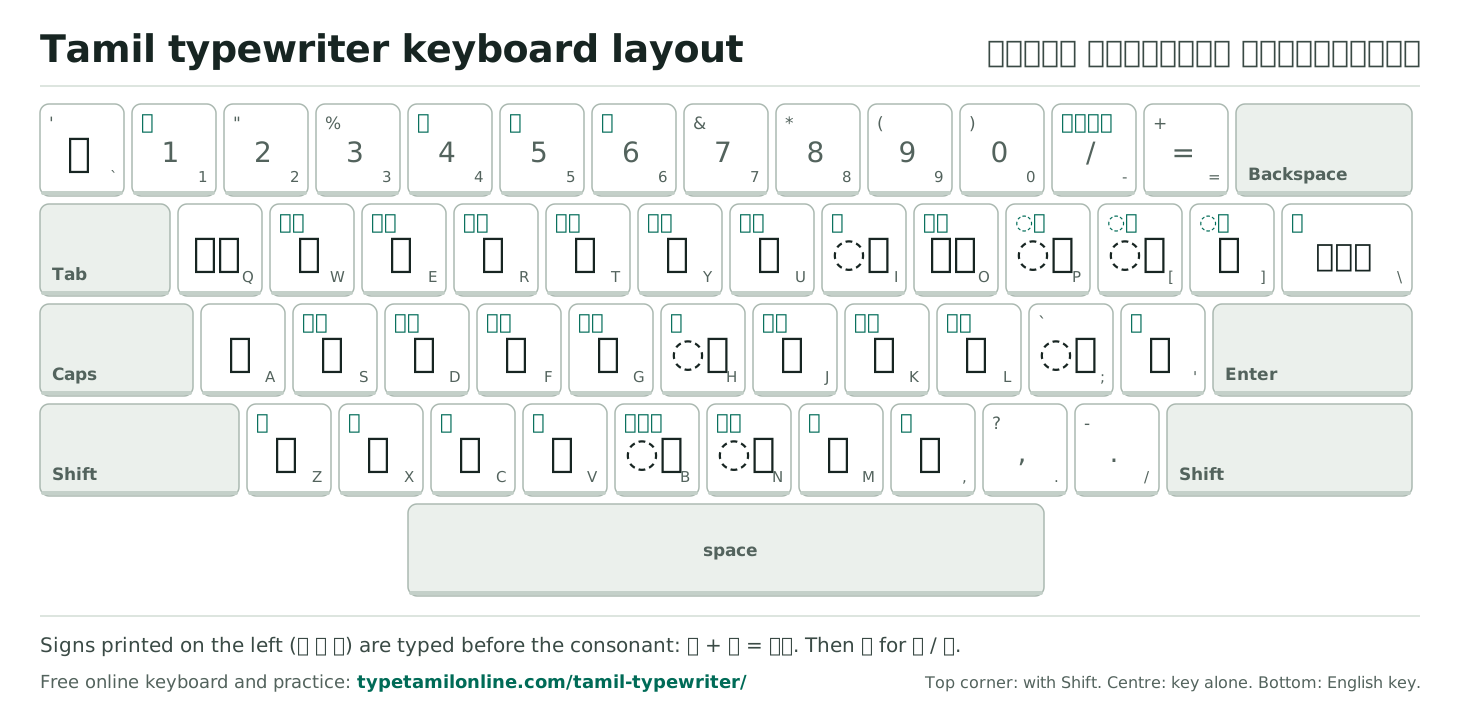
Tamil Typewriter Keyboard Layout
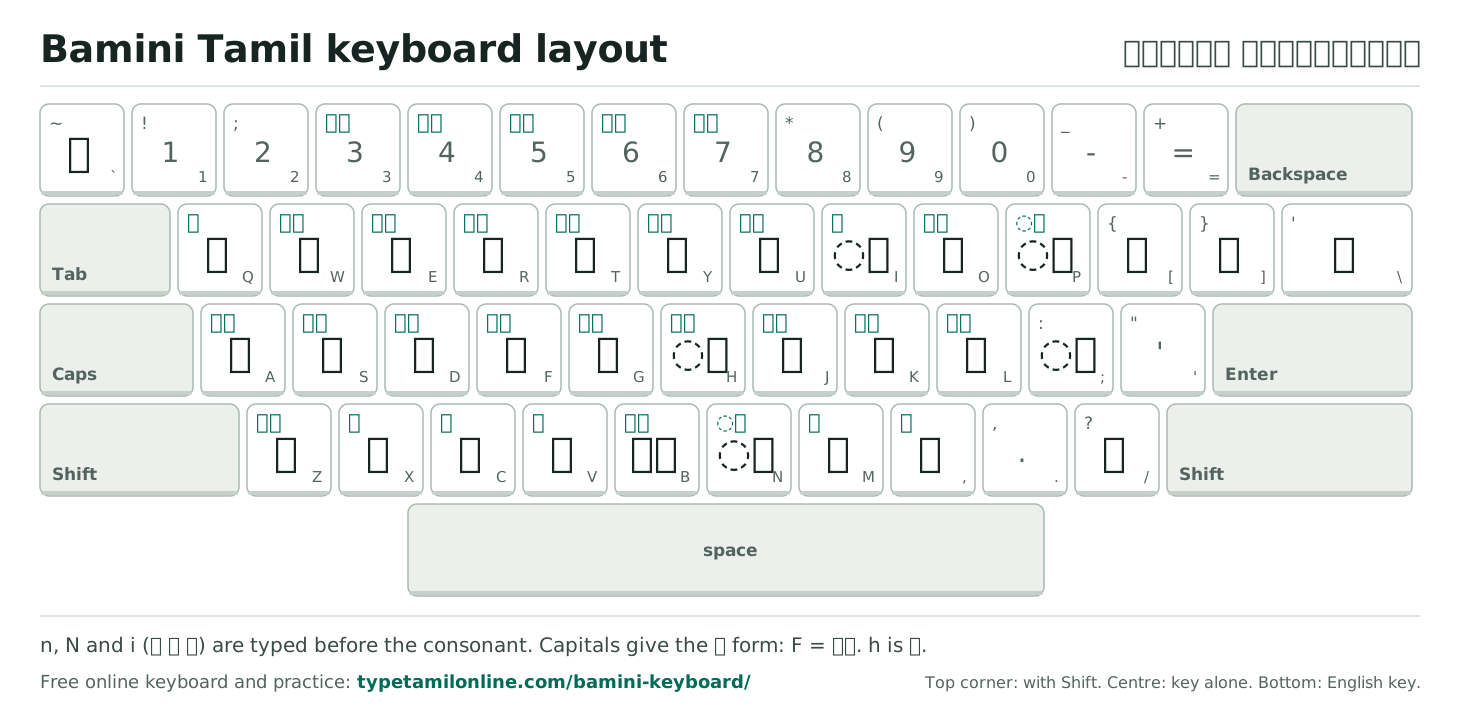
Bamini Tamil Keyboard Layout
Tamil InScript Keyboard Layout
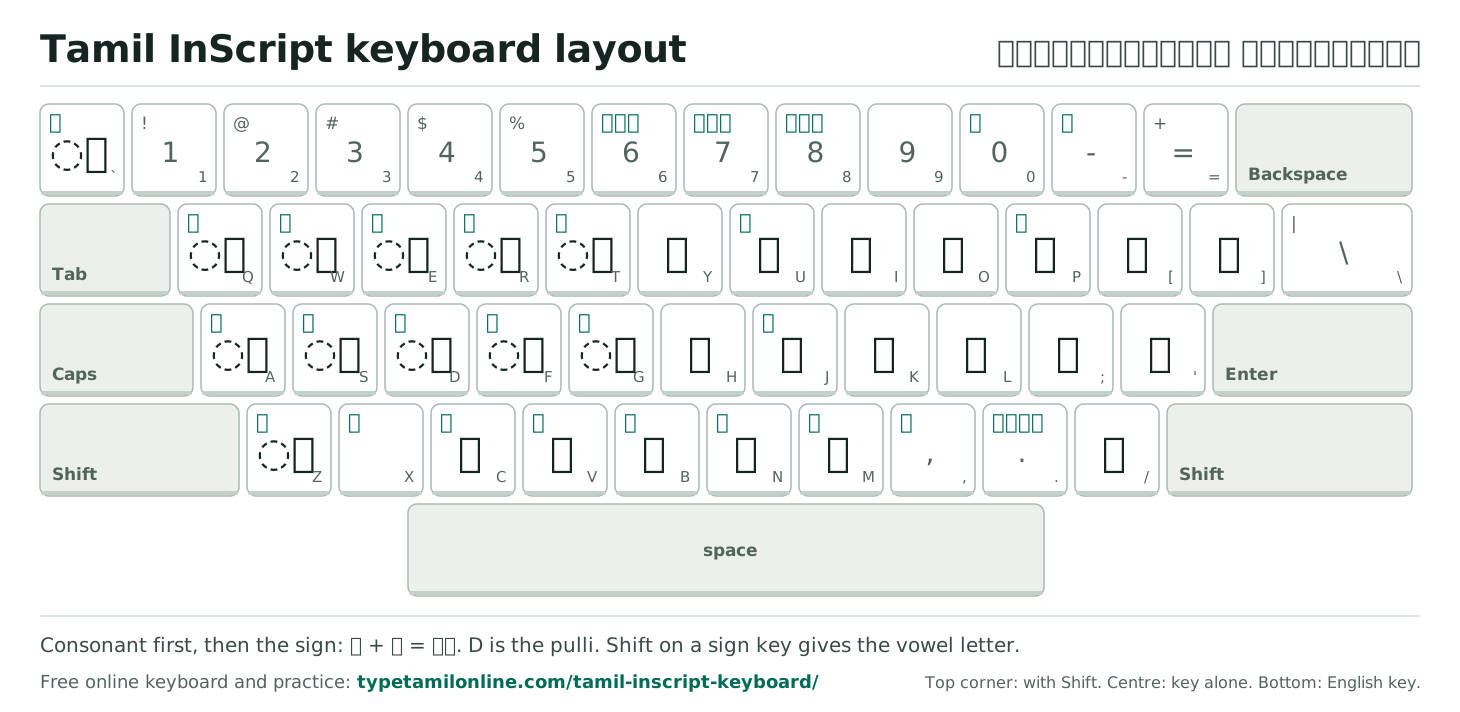
Which one is yours
Five Tamil Keyboard Layouts Compared
All five produce the same Unicode Tamil; they differ in which key gives which letter and in how letters are joined. The table types the same two letters and the same sentence on every layout, using each layout's real rules, so you can see the difference in effort.
| Layout | How you type கொ | Keys for நான் தினமும் தமிழில் எழுதுகிறேன் | Who uses it |
|---|---|---|---|
| Phonetic | ko | 36 | Anyone who can write Tanglish. Nothing to learn. |
| Tamil99 | HC | 32 | The Tamil Nadu government standard. New learners who want a Tamil-only layout. |
| Typewriter | BFH | 29 | Typists trained on Tamil typewriters and typewriting institutes. |
| Bamini | NFH | 29 | Sri Lankan and diaspora typists, DTP and print shops. |
| InScript | K` | 32 | People who also type Hindi or another Indian script; the Windows "Tamil" keyboard. |
Key counts include spaces and Shift-combinations count as one key. Phonetic counts the letters of naan thinamum thamizhil ezhuthukiREn.
Reading a chart
Three Labels on Every Key
- Centre: the letter the key types on its own. A dotted circle (◌ி) marks a vowel sign that joins the letter before it, or after it on the typewriter and Bamini layouts.
- Top corner, in green: the letter with Shift.
- Bottom right: the English key underneath, so you can find it on any keyboard.
The home keys F and J have small bumps on real keyboards. Rest your index fingers there and the rest of the chart falls under the right fingers. When you are ready, take a lesson in Tamil typing practice or measure yourself with the Tamil typing test.
Sources: Tamil99 from Keyman ta99 Extended (© thamizha.com and SIL Global), typewriter from Keyman Tamil Typewriter (© Visual Media and SIL Global), Bamini from Keyman Suratha Bamini (© thamizha.com and SIL Global), InScript from Keyman Tamil Basic (© SIL International), all MIT licence via github.com/keymanapp/keyboards. Phonetic from our own editor. Not affiliated with Keyman, SIL or the authors.
Questions People Ask
Which Tamil keyboard picture should I print?
Print the layout you type with. If you are not sure: the typewriter chart for typewriting exams and institutes, Tamil99 if you are learning Tamil touch typing from scratch, Bamini if you learned in Sri Lanka, and the phonetic chart if you type Tamil in English letters.
How do I print one chart on a single page?
Press Print under the chart. The page switches to a print layout with that chart alone on an A4 landscape sheet. To print all five, use your browser's print command: each chart gets its own page. Inspect the print preview before using paper.
Can I download the Tamil keyboard image?
Yes. Download PNG saves a high-resolution picture (2920 pixels wide) that you can share or set as a wallpaper. SVG saves a vector image that stays sharp at any size, which is best for printing large. Choose the format that suits where you plan to use the chart.
Are these charts accurate?
They are drawn by the same code that runs our online keyboards, from key tables taken from open-source Keyman keyboards (MIT licence) and checked against a second source. If a key on the chart were wrong, the keyboard on the matching page would be wrong in the same way, and our automated tests check both.
What do the three labels on each key mean?
The large letter in the centre is what the key types on its own. The small green letter in the top corner is what it types with Shift. The small grey letter at the bottom right is the English key it sits on.
Is there a Keyman Tamil keyboard image?
The Tamil99, typewriter, Bamini and InScript charts on this page follow the Keyman keyboards for those layouts (ta99 Extended, Tamil Typewriter by Visual Media, Suratha Bamini and Tamil Basic), so they also work as a picture of those Keyman keyboards. We are not affiliated with Keyman or SIL.
Can I save a Tamil keyboard chart as a PDF?
Yes, if your browser’s print dialog offers a PDF destination. Choose Print under the chart you need, inspect the preview, then choose the PDF destination instead of a physical printer. The page’s own image downloads are PNG and SVG. Check that the entire chart fits before saving, particularly if you changed the paper size or print scale.
Will downloading a keyboard picture install the Tamil layout?
No. PNG and SVG downloads are reference pictures; they do not change what your physical keys type. Follow the practice link under the relevant chart to use that layout online. To type directly inside other programs, use the computer setup guide. Choose the same layout in your software as the one named on your reference image.
Which chart should I give a child learning Tamil overseas?
Choose a chart that matches the way the child will practise. The phonetic reference suits a learner who knows spoken Tamil in English letters, while Tamil99 introduces fixed Tamil letter positions. A chart alone does not teach spelling or pronunciation. Pair it with short words checked by a Tamil reader, and use the linked keyboard so the child can test each sequence.
Why does my printed chart not match the Tamil keyboard on my computer?
The selected layout may be different. Check the chart title and your computer’s full input-source name before comparing individual keys. Tamil99, InScript, Bamini and Typewriter do not share one universal Tamil arrangement. If you use the online practice link below a chart, keep your system input on English so a second Tamil input method does not interpret the keystrokes first.